How TikTok Captions Affect the Algorithm
TikTok's recommendation algorithm reads caption text to understand what your video is about and match it to viewers who engage with similar content. A video about '5 kitchen gadgets that actually save time' will be distributed to an audience that engages with cooking content, kitchen products, and time-saving tips — but only if the caption (and audio text, on-screen text, and hashtags) clearly signals that context.
Beyond discoverability, captions directly drive comments — one of the strongest distribution signals in TikTok's algorithm. A caption that ends with a specific, interesting question consistently generates more comments than one that does not. More comments in the first few hours signals active engagement, which triggers wider distribution at each stage of TikTok's progressive testing model.
Comments also extend the lifespan of a video. TikTok continues distributing videos that maintain engagement activity — a video with an active comment thread from a week ago may still appear on For You pages, while a similar video without comments fades quickly from distribution.
TikTok Caption Length: The Real Best Practices
TikTok captions support up to 2,200 characters — roughly 400 words. But optimal caption length varies significantly by content type.
Short captions (1–2 lines): when they work
Short captions work best when your video's content is self-explanatory, when brevity itself creates impact (comedy and relatable content), and when you want the video to speak for itself without text competing for attention. The most shared and saved TikTok comedy videos often have one-line captions that add a single layer of irony or context to what is shown.
Examples of effective short captions:
- 'POV: you finally fixed the thing you have been ignoring for six months'
- 'This is your sign to try this recipe today'
- 'Nobody talks about this stage of starting a business 👀'
- 'I am not the same person I was before this workout routine'
Medium captions (3–6 lines): the versatile default
Medium captions work for most educational, tutorial, and niche content. They provide enough context for the algorithm to understand the video's topic, include relevant keywords naturally, and often feature the question or CTA that drives comments. Most TikTok creators find the 3–6 line range works best across the widest variety of content types.
Long captions (7+ lines): when to use them
Long captions are appropriate for story-driven content, controversial takes where you need to preempt objections, educational deep-dives where text supplements the video, and any content where viewers are likely to pause and read. Note that TikTok truncates captions after roughly 3 lines with a 'more' button — the opening lines need to be compelling enough to earn that tap, just like Instagram.
30+ Real TikTok Caption Examples by Niche
The most useful way to learn caption writing is to read examples. These are structured captions, not just descriptions — each one is designed to do a specific job.
Fitness and Health:
- '6 months ago I could not do one pull-up. Here is what changed. The program is in my bio for free.'
- 'Nobody tells you the first 3 weeks feel like nothing is working. Keep going.'
- 'I lost 12kg without ever being hungry. The key was eating MORE of these specific foods 👇'
- 'The workout that fixed my back pain after 2 years of physio didn't work. Full routine below.'
Finance and Business:
- 'I made my first £1,000 online with zero experience. The method still works in 2026.'
- 'Things I wish someone told me before starting a business at 24.'
- 'The budget spreadsheet I have used for 3 years — link in bio, completely free.'
- 'Why the advice to cut your coffee to save money is genuinely bad advice (and what to do instead).'
Food and Cooking:
- 'I have tested 8 pasta carbonara recipes. This is the only one worth making.'
- 'Dinner in 12 minutes with 4 ingredients. Recipe is pinned in comments.'
- 'My grandmother taught me this. I have never seen it anywhere else.'
- 'Why does homemade bread always taste better the day after? I finally figured it out.'
Fashion and Beauty:
- 'The trick for making drugstore foundation look expensive. A makeup artist told me this last year.'
- 'Outfits I wear on repeat because they always get compliments. All under £60 total.'
- 'I stopped buying new clothes for 6 months. This is what I learned about my actual style.'
Productivity and Life:
- 'The 3 changes that took me from constantly behind to always ahead. None of them are what you expect.'
- 'I blocked social media for 14 days. Genuinely did not expect what happened.'
- 'Your mornings determine your days more than anything else. Here is the routine that finally worked for me.'
Notice the patterns: specific numbers and timeframes, personal experience over generic advice, curiosity gaps that require watching or reading further, and natural conversational language rather than formal writing.
Using Keywords in TikTok Captions for Discovery
TikTok has expanded its search functionality significantly, and creators who optimise captions for search queries are seeing sustained discovery-driven traffic that outlasts the initial For You page distribution window.
The approach is simple: identify 2–3 natural keyword phrases that your target viewer would type into TikTok search to find content like yours, and include them naturally in your caption. 'Easy meal prep ideas for beginners' is a search phrase. 'Budget meal prep for the week' is another. Include one of these naturally in your caption and your video may appear in search results for weeks or months after posting.
This search-optimised caption writing does not require awkward keyword stuffing. The natural language of a good caption — describing what the video is about, who it is for, and what they will get from it — usually includes the relevant keywords organically. Write the caption naturally first, then check that your primary keyword appears somewhere in the first 2–3 lines.
The Comment-Driving Question: Your Most Powerful Caption Tool
The single most effective addition to any TikTok caption is a well-designed question. Not a generic 'What do you think?' but a specific question that your target audience genuinely wants to answer.
What makes a question generate comments
The best comment-driving questions have three characteristics: they are specific enough that different viewers will have different genuine answers, they are easy to answer briefly (one sentence), and they connect emotionally to something the viewer just experienced watching your video.
Weak questions (generic, low response):
- 'What do you think?'
- 'Did you like this?'
- 'Let me know in the comments.'
Strong questions (specific, high response):
- 'What was the thing nobody told you before you started [topic]?'
- 'Which one do you actually do?'
- 'What would you add to this list?'
- 'Has anyone else experienced this?'
- 'Which stage are you at right now?'
The last question — 'Which stage are you at right now?' — is particularly effective for any content about a journey or process because every viewer has a genuine, specific answer that differs from other viewers. It generates not just initial comments but reply threads as viewers engage with each other's answers.
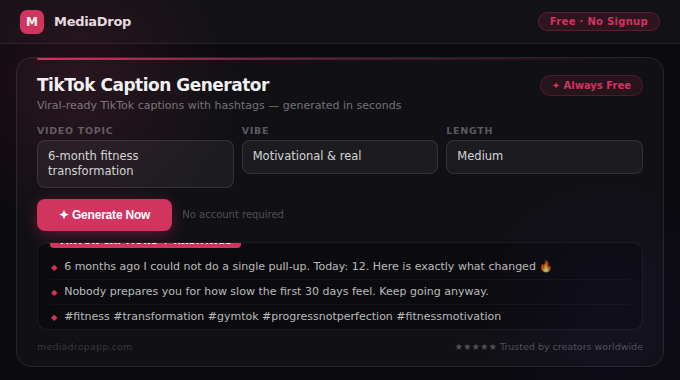
Use TikTok Caption Generator to generate 5 complete caption options for any video topic, each including a comment-driving question and relevant hashtags.
Conclusion
TikTok captions are a strategic tool that most creators underuse. The combination of algorithm-readable keywords, genuine storytelling or specific information, and a well-designed comment-driving question consistently outperforms the minimal caption most creators default to.
Start with the examples in this guide as templates, then personalise them with your specific voice, numbers, and experiences. The personalisation step — which takes 2–3 minutes per caption — is what separates captions that feel authentic from those that feel generic. Authentic captions drive shares; generic ones drive nothing.