Why Subtitles Are No Longer Optional for Creators
The context in which most people watch social media video has changed completely. In 2026, the typical social media video is watched on a phone in a public place, with the screen muted to avoid disturbing others. Without subtitles, that viewer sees moving images but cannot follow the content at all — and scrolls away.
Beyond the silent viewing context, subtitles provide three additional benefits that directly impact reach and growth:
Accessibility
Approximately 430 million people worldwide have disabling hearing loss. Subtitles make your content accessible to this audience — a group that is actively looking for creators who make their content inclusive. Creators who prioritise accessibility often develop particularly loyal audiences among deaf and hard-of-hearing viewers.
Non-native speaker reach
If your content is in English, adding subtitles significantly improves comprehension for the approximately 1.5 billion non-native English speakers worldwide. Many non-native speakers are fluent readers but find spoken English at natural pace difficult to follow — subtitles bridge that gap and expand your effective audience globally.
Algorithm signals
TikTok, Instagram, and YouTube can read subtitle text, which adds keyword content to your video for the algorithm's content categorisation system. A video with subtitles provides significantly more text context than a video without — improving the algorithm's ability to match your content to interested viewers. Auto-subtitles added directly through these platforms serve this function, but editing them for accuracy and keyword relevance adds additional value.
How AI Subtitle Generation Works
AI-powered subtitle generators use automatic speech recognition (ASR) to analyse your video's audio track and convert spoken words to time-stamped text. Modern ASR systems are trained on enormous datasets of human speech across accents, dialects, and speaking styles — achieving accuracy rates of 85–95% for clear speech in quiet environments.
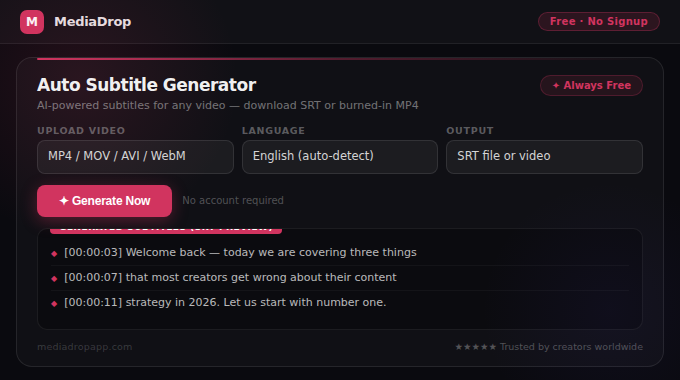
The output is typically an SRT file (SubRip Text) — the industry standard subtitle format. An SRT file contains numbered subtitle entries, each with a time code showing when it appears and disappears, and the text content. SRT files can be imported into virtually every video editing platform: Premiere Pro, Final Cut Pro, DaVinci Resolve, CapCut, iMovie, and others.
Alternatively, some tools burn subtitles directly into the video — permanently embedding the text into the video frames. Burned-in subtitles ensure viewers always see the subtitles regardless of whether their player supports SRT files, which is important for social media where SRT import is not always possible.
Use Auto Subtitle Generator to automatically generate accurate, time-stamped subtitles for any video. For a text-only transcript (no time codes), use Video Transcript Generator.
Step-by-Step: Adding Subtitles with the Auto Subtitle Generator
- Go to Auto Subtitle Generator.
- Upload your video file. Supported formats: MP4, MOV, AVI, WebM. Recommended maximum length: depends on your file size.
- Select the language of the spoken content in your video. Selecting the correct language significantly improves accuracy, especially for non-English content.
- Click Generate Subtitles and wait for the AI to process your audio track. Processing time typically ranges from 30 seconds to a few minutes depending on video length.
- Review the generated subtitles. AI is not perfect — proper nouns, technical terms, numbers, and strong accents may have errors. Review each subtitle line and correct any mistakes before downloading.
- Download your preferred format:
- SRT file — for importing into a video editor or uploading to YouTube
- Video with burned-in subtitles — for direct upload to TikTok, Instagram Reels, or any platform
Pro tip: Always review AI-generated subtitles before using them. AI accuracy is high for clear speech but errors in names, specialised terminology, or strong accents can make subtitles look unprofessional or create misunderstandings.
Platform-Specific Subtitle Guidance
TikTok
TikTok has a built-in auto-caption feature in its creation tools. However, TikTok's auto-captions can be less accurate than dedicated tools for clear speech in non-American accents. For best results: generate subtitles using MediaDrop's tool, review and correct them, then either burn them into the video before uploading or upload the video to TikTok and use the built-in captions tool and edit for accuracy.
Instagram Reels
Instagram's auto-caption sticker in Stories and Reels generates captions automatically but with similar accuracy limitations. The sticker-style captions also appear in the middle of the frame. For more control over caption style and placement, burn subtitles into the video before uploading using a video editor. This also ensures subtitles are visible if Instagram's auto-caption feature fails or is slow to generate.
YouTube
YouTube auto-generates captions for most videos in supported languages. These are good enough for most content but often miss names and technical terms. For SEO purposes, uploading an SRT file is better than relying on YouTube's auto-captions because it gives you control over the exact text — which becomes indexable content in YouTube search. Upload your SRT file in YouTube Studio → Subtitles → Add Language → Upload File.
Facebook Video
Facebook automatically generates captions for videos but also supports uploading SRT files for precise control. Facebook shows auto-captions by default for videos shown in the feed — making subtitle accuracy particularly important here since most feed videos are shown silently.
Tips for Better Subtitle Accuracy
Record in a quiet environment. Background noise, music, and echo all reduce ASR accuracy. Even minimal background noise can cause speech recognition to miss words or generate incorrect substitutions. Record in the quietest space available, close to the microphone.
Speak clearly and at moderate pace. Speaking at your natural conversation pace or slightly slower (not artificially slow) produces the best recognition results. Rapid speech with lots of connected words produces more errors than clearly separated words.
Use a quality microphone. A lavalier microphone clipped close to the speaker, a dedicated USB microphone, or a camera-mounted microphone all produce better audio quality than your phone's built-in microphone from a distance.
Avoid speaking over background music. Background music that runs under speech significantly confuses speech recognition systems. If you use background music in your videos, reduce it to near-zero during any spoken sections for the best subtitle generation results.
Review proper nouns manually. Names of people, places, brands, and technical terms are the most common sources of AI subtitle errors. After generating subtitles, scan specifically for any proper nouns in your video and check them manually.
Conclusion
Adding subtitles is one of the simplest improvements with one of the widest-reaching benefits: more viewers can follow your content in silent viewing contexts, deaf and hard-of-hearing audiences gain access to your content, non-native speakers understand you more easily, and the algorithm gains more text context to match your content to interested viewers.
The process is straightforward: upload your video to Auto Subtitle Generator, review and correct the AI-generated text, and download either an SRT file or a video with burned-in captions. The 5–10 minutes spent reviewing subtitles pays back in every view from the 85% of viewers watching without sound.