What Instagram Content Can You Download?
Instagram hosts many types of content, and what can be downloaded depends on two things: the content type and whether the post is publicly accessible. MediaDrop works with the following types of supported public Instagram content:
- Reels — short vertical videos, typically 15 to 90 seconds
- Standard video posts — longer videos posted to the feed
- Photo posts — single images from public profiles
- Carousel posts — multi-image or multi-video posts
- Public stories — when the story link is accessible
The single most important requirement is that the Instagram link must be publicly accessible. This means the account must be public, the post must still exist, and the content must not be restricted by region or age settings. Private accounts, deleted posts, archived content, and expired stories cannot be downloaded by any tool — not just MediaDrop.
A quick way to test whether a link is truly public: open it in a browser where you are not logged into Instagram. If the content loads, it is public and should work. If you are redirected to the login page, the content is not accessible without authentication and no downloader can retrieve it.
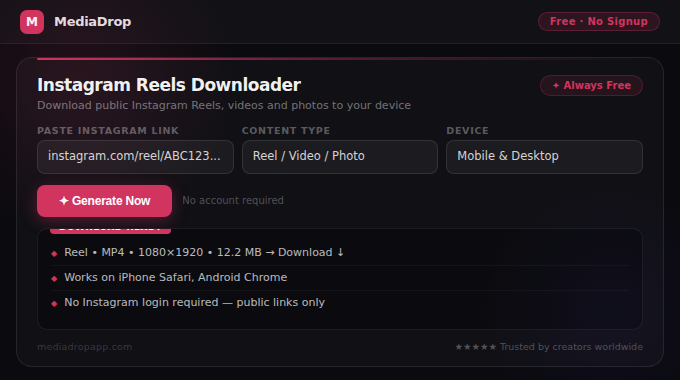
For standard video posts, use Instagram Video Downloader. For short-form Reels content specifically, use Instagram Reels Downloader.
Step-by-Step Guide: How to Download Instagram Content
The process takes under a minute once you have the correct link. Here is the complete step-by-step guide that works on iPhone, Android, desktop, and tablet browsers.
On Mobile (iPhone or Android)
- Open the Instagram app and navigate to the Reel, video, or photo you want to download.
- Tap the three-dot menu (⋯) in the top right corner of the post, or tap the share icon (the arrow icon below the post).
- Tap Copy Link from the options that appear.
- Open your browser (Chrome, Safari, or any modern browser) and go to mediadropapp.com/instagram-reels-downloader or the appropriate tool page.
- Tap the input field and paste the link you copied.
- Tap the Download button.
- Wait 3–10 seconds for MediaDrop to prepare the available download options.
- Tap the download link and save the file to your device.
On Desktop
- Go to Instagram in your browser and navigate to the post.
- Click the three-dot menu (⋯) on the post.
- Click Copy Link. Alternatively, copy the full URL from your browser's address bar — this also works.
- Open a new tab and go to the appropriate MediaDrop tool.
- Paste the link into the input field.
- Click Download and wait for the result.
- Right-click the download link and choose Save link as... to save the file.
If the download does not appear after 10–15 seconds, the most common fix is to go back to Instagram, copy the link again fresh, and try once more. Links that are copied from messages, notifications, or external sites sometimes include extra parameters that interfere with processing.
Why Some Instagram Links Do Not Work
When a download attempt fails, it falls into one of a handful of categories. Understanding these makes troubleshooting fast.
The post is private
If the account that posted the content has a private profile, no external tool can access it. The fix is simple: verify the link works when you open it without being logged in. If it does not, it cannot be downloaded.
The story has expired
Instagram Stories automatically expire 24 hours after posting unless the creator saves them as Highlights. Once expired, the link no longer works and the content is gone from Instagram's public servers.
The content was deleted
If the creator deleted the post after you copied the link, the URL will no longer resolve to any content. This is a platform-level removal — no tool can retrieve deleted posts.
The link was copied incorrectly
This is the most frequent fixable cause of failures. When copying from the Instagram app, always use the Copy Link option from the share menu rather than copying from your browser's address bar while in the Instagram web version — these URLs sometimes include session tokens that expire. If the link ends with something like ?igshid=..., try removing the query string and pasting only the core URL.
Regional or content restrictions
Some posts are restricted to certain countries or age groups by the creator or by Instagram's content policies. These restrictions are enforced at the platform level and cannot be bypassed.
Temporarily unavailable
Occasionally Instagram's servers experience temporary issues that cause links to fail even when the content is public. Waiting a few minutes and trying again usually resolves this.
For a comprehensive troubleshooting guide, read Why Some Video Links Do Not Work or How to Copy a Social Media Video Link Correctly.
Safe and Responsible Usage of Downloaded Content
Downloading a file and having the right to use that file are two different things. This is an important distinction that many users overlook.
When you download an Instagram video or photo, you are saving a copy of a file. What you can do with that copy depends entirely on who owns the content and what permissions exist.
When downloading is straightforward
- Your own content: Downloading your own published Instagram posts is perfectly legitimate. This is one of the most common use cases — saving your own Reels, videos, and photos to your device as a backup.
- Content with explicit permission: If a creator has explicitly stated their content can be saved and shared (many educational creators do this), downloading is appropriate.
- Content licensed for reuse: Some content is published under Creative Commons or similar licenses that allow downloading and reuse under certain conditions.
When you need to be careful
- Reposting someone else's content: Even if you download a public video, reposting it on your own social media without credit and permission is generally a copyright violation and against most platforms' terms of service.
- Commercial use: Using someone else's video in any paid promotion, advertisement, or commercial context requires explicit written permission from the rights holder.
- Content with copyrighted music: Many Instagram videos use licensed background music. Downloading the video for personal reference is one thing; redistributing the audio or video publicly is another.
MediaDrop processes publicly accessible links only. Users are responsible for how they use downloaded content. For a full guide on the legal considerations, read Is It Legal to Download Social Media Videos?
MediaDrop Tools for Instagram
MediaDrop provides dedicated tools for each type of Instagram content. Using the right tool for the right content type gives the best results.
- Instagram Video Downloader — for standard video posts in the main feed
- Instagram Reels Downloader — optimised for short-form Reel content
All MediaDrop tools are completely free to use, work directly in your browser on any device, and require no account, signup, or app installation. Your links are processed and immediately discarded — nothing is stored.
MediaDrop also supports downloads from other major platforms if you need them:
Frequently Asked Questions
Does MediaDrop remove the Instagram watermark?
MediaDrop downloads the original file as Instagram serves it publicly. Instagram Reels do not typically have creator watermarks on the source file the way TikTok videos do — the watermark you sometimes see is added by the Instagram app's native share feature, not the file itself.
Can I download Instagram content on iPhone?
Yes. MediaDrop works in Safari, Chrome, and other iOS browsers. After downloading, the file saves to your Files app or Camera Roll depending on the file type.
Can I download Instagram content on Android?
Yes. MediaDrop works in Chrome and other Android browsers. Downloaded files go to your Downloads folder.
Why do I need to log in to Instagram but the tool says no login required?
You log into Instagram to find and copy the link — that is your normal use of the app. MediaDrop itself does not require you to log into Instagram or share your credentials with it. The distinction is: you find the content (logged in on your device), copy the public link, then paste it into MediaDrop (which accesses it the same way any browser would access a public URL).
Can I download Instagram Stories?
Public stories can be downloaded while they are still live (within 24 hours of posting). Once expired, story links no longer work.
Conclusion
Downloading Instagram Reels, videos, photos, and stories is straightforward when you follow the right process: verify the content is public, copy the link correctly using Instagram's share option, use the appropriate MediaDrop tool, and save the file.
The most common problems — failed links, missing results, expired content — all have clear causes and quick fixes once you understand how Instagram's public content system works. Use the troubleshooting guidance in this article and the linked guides to solve most issues within minutes.
Always use downloaded content responsibly. MediaDrop is built to help you access your own content and publicly shared media — not to bypass privacy protections or enable copyright violations.